iPhone app
LiDAR-guided plant capture, phenotyping, and field workflows on iPhone.
 iPhonotype
Facility-inspired plant phenotyping, now portable
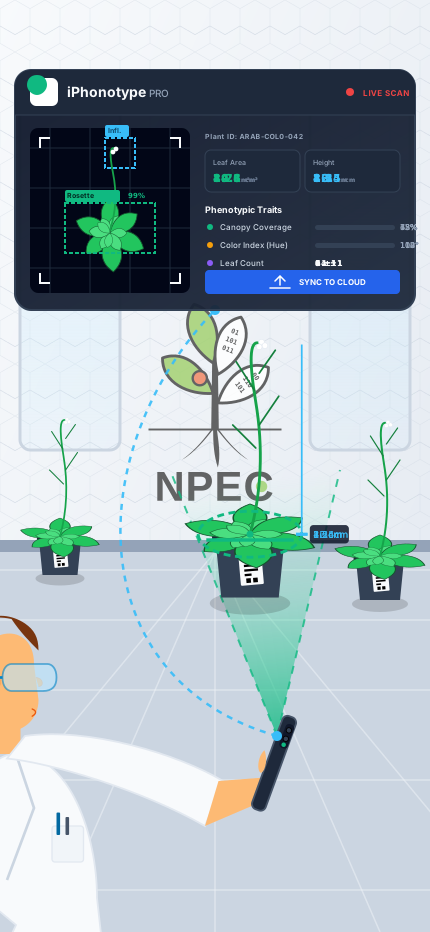
iPhonotype turns iPhone into a LiDAR-guided plant phenotyping tool that removes manual scaling, tripods, and rigid capture setups. Built-in LiDAR and RGB fusion keep scale grounded while users move freely around complex plant structures, and the system benefits from richer scans through oversampling and optimized compute instead of punishing them. Right away, the app can track plants, perform semantic leaf segmentation, estimate full 3D volume, and support broader phenotyping measurements through auto-guided scans that stay approachable for new users and deep enough for serious plant science.

iPhonotype 2.0.0 Update
Interactive 3DGS plant scans. Orbit two real reconstructions directly in the browser, switch between splats and points, or open either scan full frame.
Grass field scan. A high-resolution grass canopy captured in the Ecotrons at NPEC and rendered from 965K Gaussian splats.
Echinacea purpurea in the NPEC Ecotron. A high-resolution whole-plant reconstruction from the Flash Drought experiment.
Privacy
iPhonotype is designed as a local-first workflow. The iPhone app and Mac Companion do not send us your scans, projects, images, models, or experimental records. Google Analytics is not enabled on the public website.
Users keep full ownership and control over their data from capture through analysis and export. There is no account requirement, no hidden upload path, and no need to trust a remote backend with sensitive research or field data.
At a time when many people are tired of their data being swept into training pipelines for large AI companies, we believe the person who creates the data should remain its sole owner.
Real workflows
These images focus on Mac Companion validation, captured scene reconstruction, tray-scale 3D geometry, and the pipeline that leads to multi-color printable assets.
At the Netherlands Plant Eco-phenotyping Centre (NPEC) Ecotron Module, we can scan relatively large plants inside a cylindrical habitat only 60 cm in diameter because the device remains compact and the operator keeps enough freedom to move into narrow gaps, tight recesses, and other occluded parts of the canopy.
3D reconstruction pipeline
The reconstruction pipeline works with 3D scans from large growth chambers to tray-level capture, starting inside the Helios chamber with hundreds of emerging potato plants.
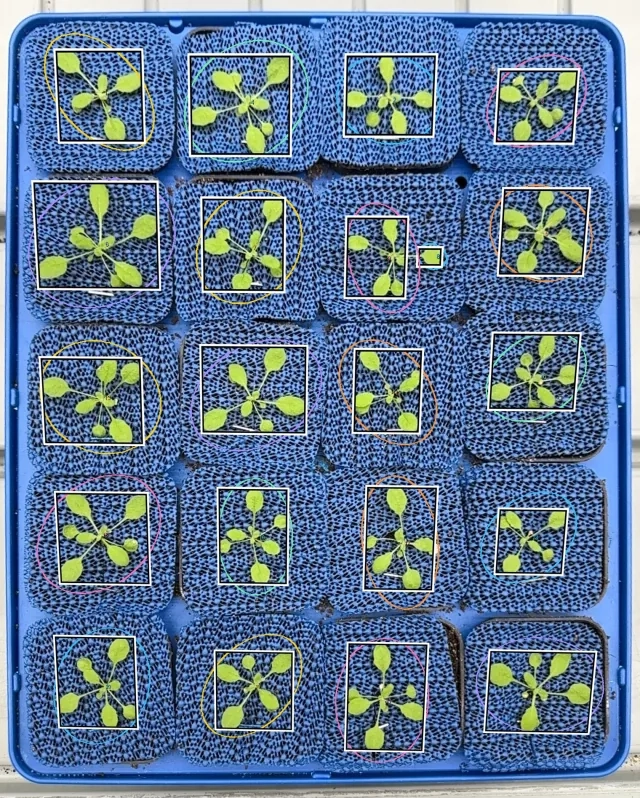
It is also portable and mobile enough to fit and work inside double-shelf chambers, where Arabidopsis rosettes grow tightly packed.
This tray-level Arabidopsis scan captures 17 plants in less than a minute while preserving enough structure for per-plant convex hulls, rosette footprint, apex height, and longest-leaf measurements. The result is a compact but information-rich 3D scene that keeps the whole tray readable while still supporting plant-by-plant geometry and color analysis.
 Future thermal fusion with FLIR One
A compact FLIR One thermal imager can soon become part of the iPhonotype workflow. Because FLIR exposes an SDK for this device, the app is being prepared to tap into live thermal imagery, fuse it with the existing 3D scans, and analyze temperature patterns directly on reconstructed plant geometry.
View the Amazon example
Future thermal fusion with FLIR One
A compact FLIR One thermal imager can soon become part of the iPhonotype workflow. Because FLIR exposes an SDK for this device, the app is being prepared to tap into live thermal imagery, fuse it with the existing 3D scans, and analyze temperature patterns directly on reconstructed plant geometry.
View the Amazon example


Multi-color 3D printing
The same iPhonotype reconstruction pipeline can turn a captured plant scene into a ready-to-print multi-color model bundle without rebuilding the geometry by hand. This example was prepared into a five-color Prusa XL workflow with preserved structure, mapped color regions, and slicer-ready exports.
In practice, that means teams can move from mobile capture to a printable physical replica for outreach, teaching, inspection, or downstream fabrication, while keeping the geometry, learned color inference, and print segmentation tied to the original scan.
iOS app
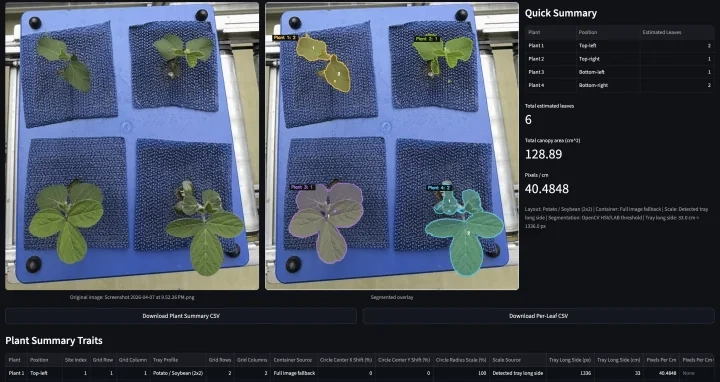
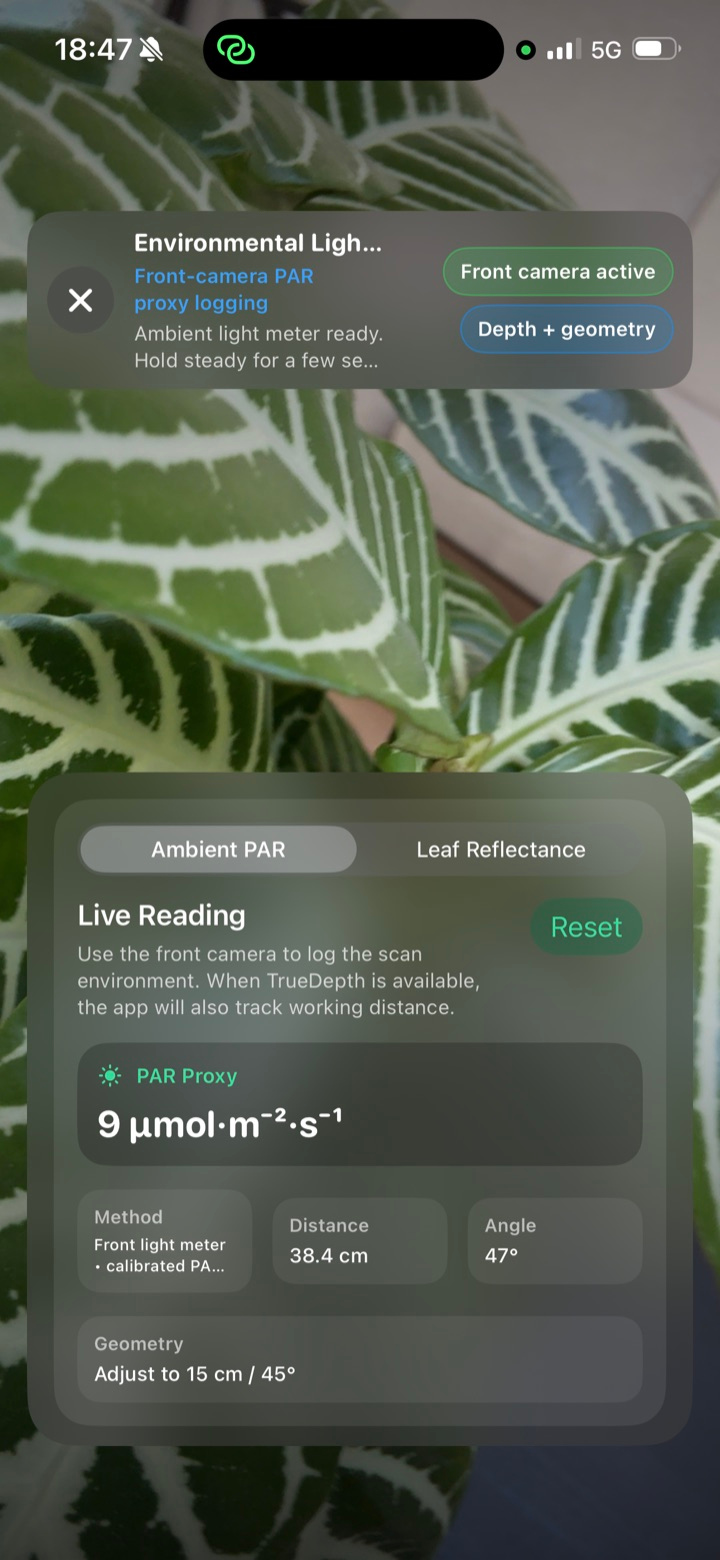
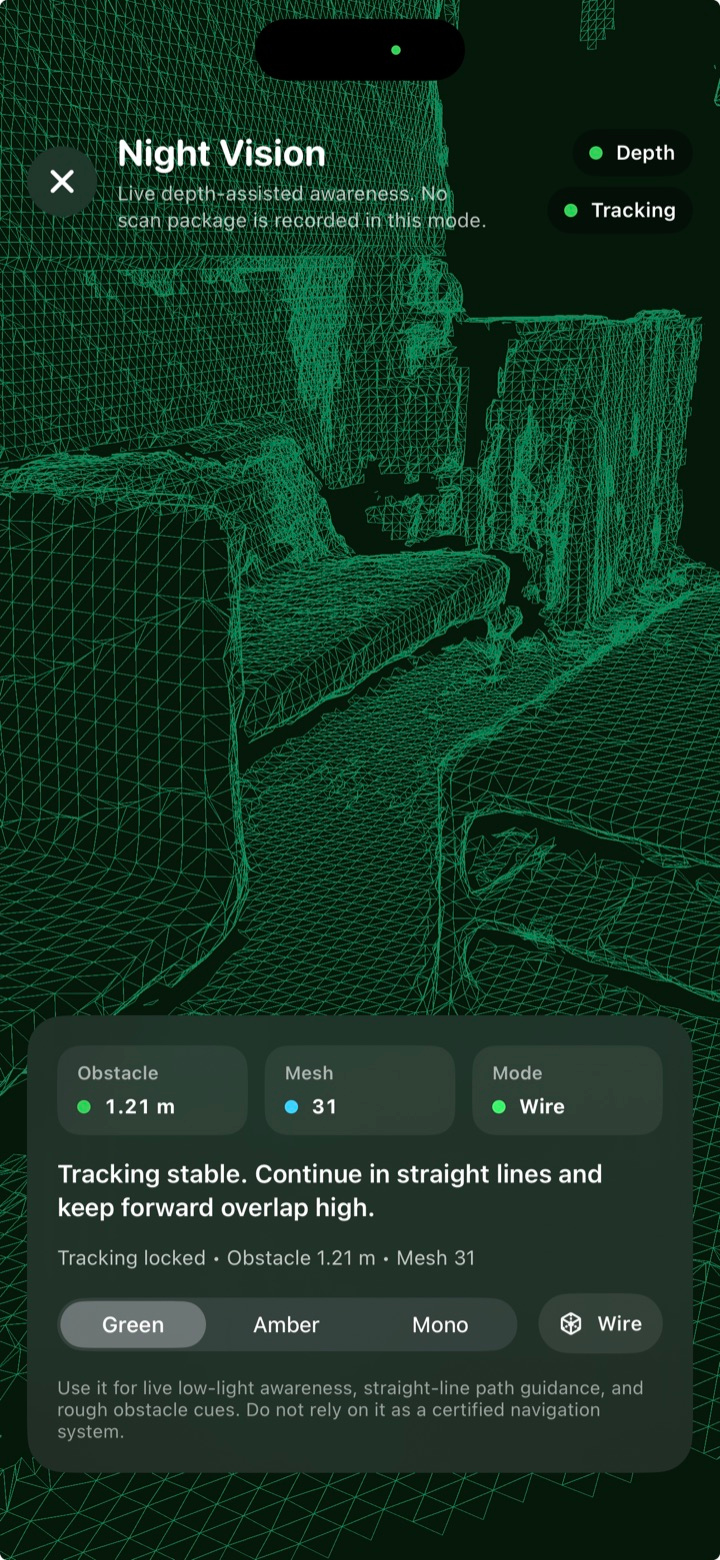
This section focuses on the mobile side of iPhonotype: real tray capture in the phenotyping environment and iPhone-side outputs that structure plant detections before deeper Mac-based review.
 Recommended backlight panel
A slim LED tracing panel can back-light petri dishes and produce the high-contrast silhouettes that work well with the built-in segmentation models.
View the Amazon example
Recommended backlight panel
A slim LED tracing panel can back-light petri dishes and produce the high-contrast silhouettes that work well with the built-in segmentation models.
View the Amazon example
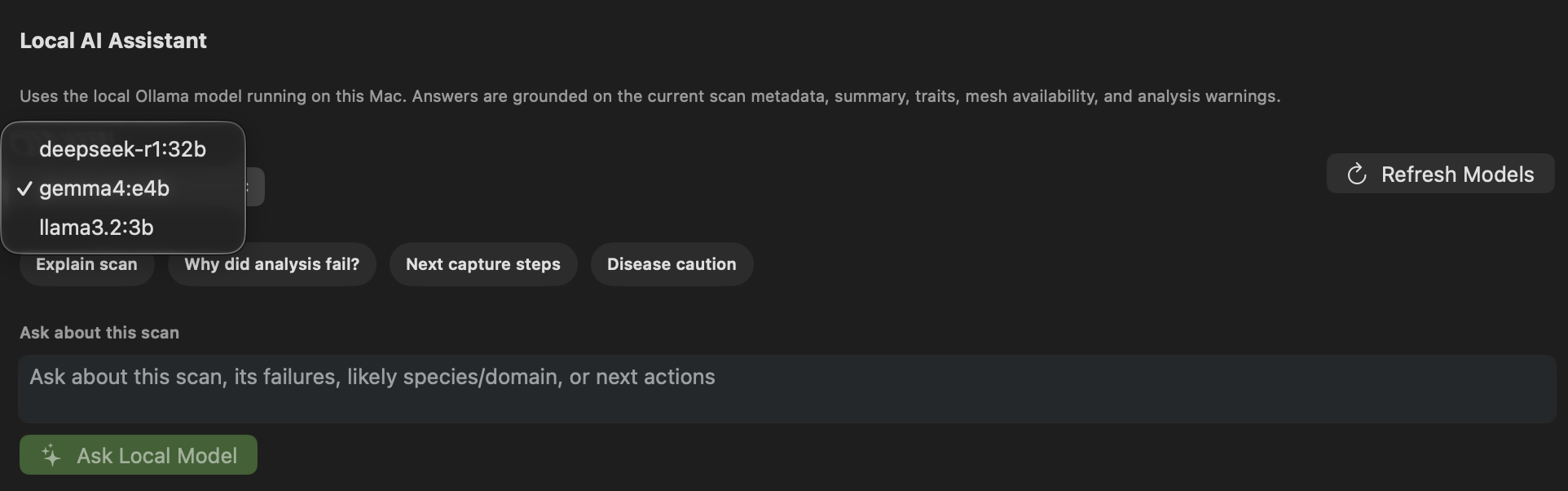
gemma4:e4b, but any suitable open-weights model can be used depending on the machine and the task.
Key capabilities
Capture plants in growth chambers, factory lines, petri-dish assays, orchards, and field plots without switching platforms every time the biology changes.
Recover canopy geometry, plant height, and scene structure, then use deep learning for color inference and printer mapping into ready-to-print outputs for Prusa and Snapmaker.
Ingest petri-dish photos or videos, decompose frames, stitch root coverage, and extract below-ground traits.
Track trays, petri dishes, and fruit lots with QR-linked sessions for repeat imaging and clean dataset provenance.
Record where scans were acquired so field phenotyping stays connected to place, treatment, and route.
Use advanced iPhones for LiDAR-rich capture or older iPhones for lighter image-first workflows without changing the overall platform.
The mobile experience is designed as a lightweight frontend, so users can run the iPhone side for free while the Mac Companion handles heavier processing.
Mac companion app
iPhone capture stays fast in the field and on the bench. The Mac Companion takes over for validation, organization, model runs, reconstruction, and export, so the mobile experience stays simple while the desktop side handles the deeper work.
macOS 14 or later on Apple silicon. Core analysis runtime included; advanced model training uses optional tools. This update adds range selection and experiment renaming, background root processing, root-specific batch analysis, external scan folders, and provisional 3D leaf inclination measurements. Installer checksum.
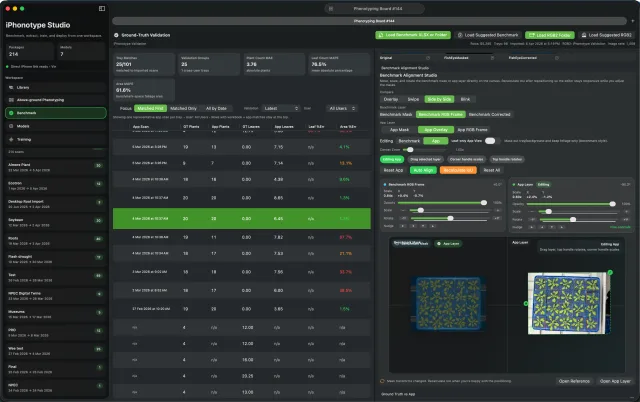
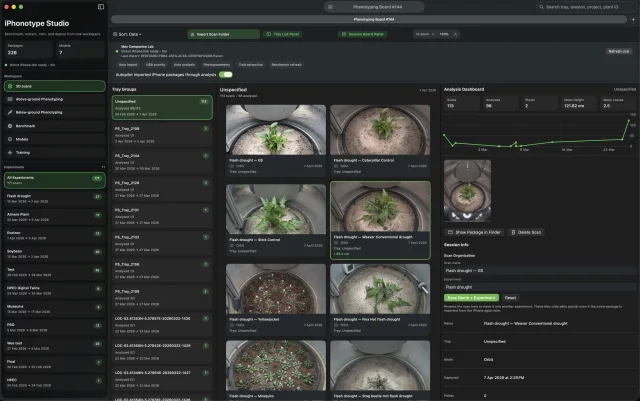
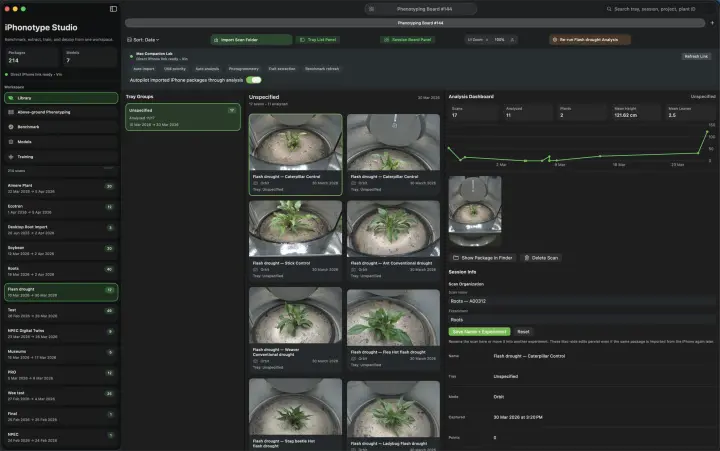
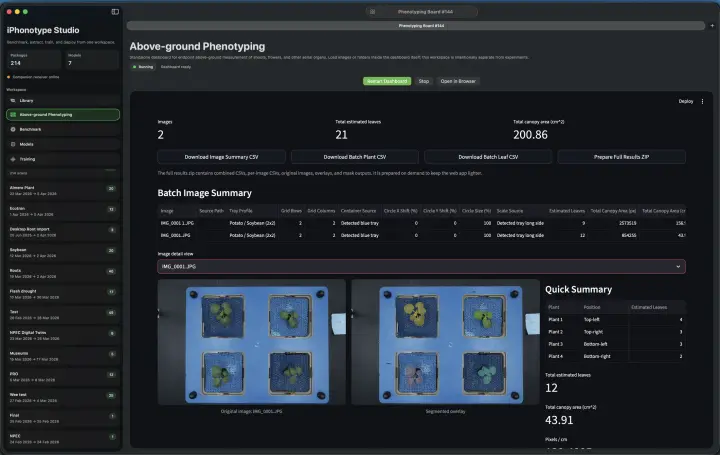
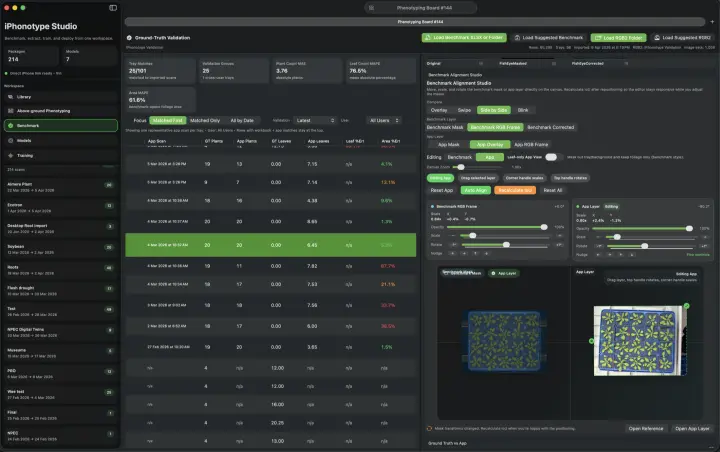
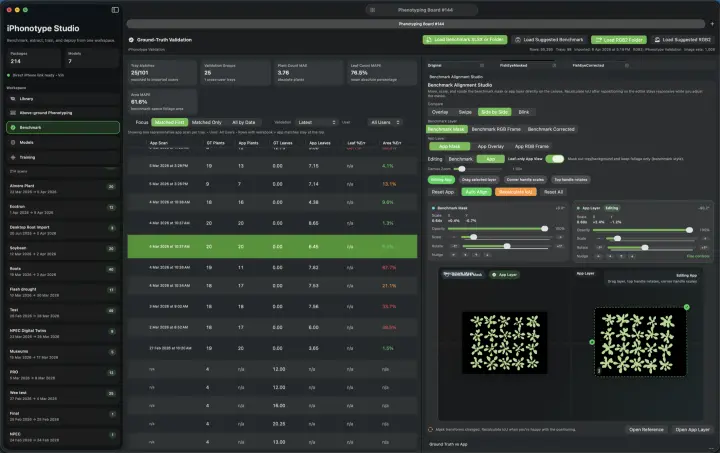
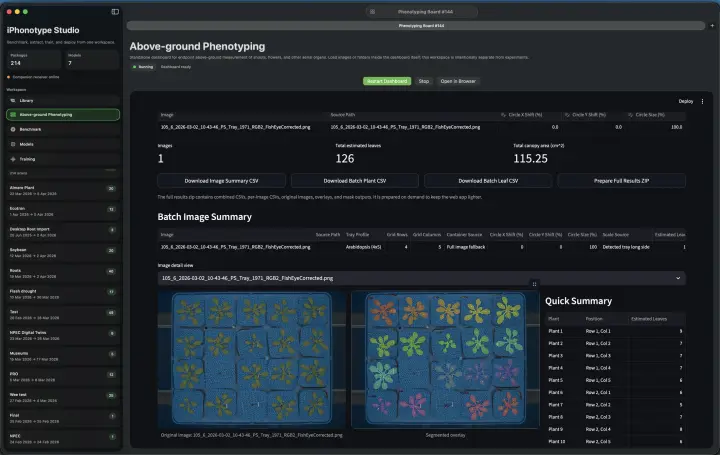
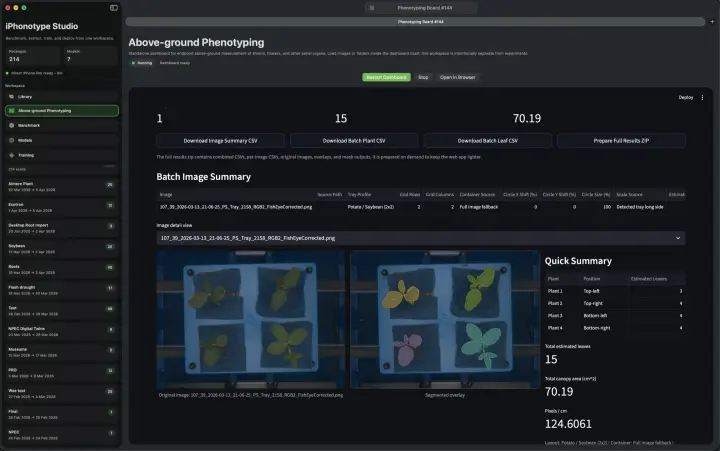
These are real screenshots from the Mac Companion app, covering benchmark validation, scan organization, and above-ground phenotyping analysis.
Use cases
Track rosettes, seedlings, roots, and treatment responses across repeat sessions with benchmark-linked calibration, model evaluation, reproducible exports, optional multi-color 3D outputs, and video-to-panorama workflows for close-range macro plant imaging.
Measure fruit geometry, surface condition, and object dimensions on benches or processing lines with QR-linked lots and Mac-side model orchestration.
Capture geolocated plant records in real environments on many classes of iPhone, then sync to the Mac Companion for deeper analysis and 3D post-processing, as well as curated dataset management.
Hardware rationale · independent evidence
TESTY REFERENCE OBJECT · MEAN SURFACE-DEVIATION SPAN
Camera-only benchmark · not LiDAR or iPhonotype accuracy
~70% lower iPhone span Galaxy span ÷ iPhone span ≈ 3.3 · this Testy dataset only
Settings matter: the same iPhone at 48 MP yielded a 0.78 mm Testy span. Image counts and capture settings differed; these ratios apply only to the reported datasets.
Controlled photogrammetry can achieve high geometric accuracy on both iPhone and Android under favourable conditions. Accuracy of one scaled reconstruction is different from metric repeatability across independently captured plants.
AprilTags or scale bars can supply external metric scale to RGB photogrammetry. iPhonotype was explicitly designed to avoid requiring calibration targets for every plant acquisition. LiDAR supplies integrated metric depth during capture, reducing that operational burden; it is not universally more precise than photogrammetry.
From single-scan accuracy to between-scan repeatability →
Apple lists a LiDAR Scanner on the iPhone 15 Pro Max. Samsung’s S24 Ultra specifications list Laser AF and do not list a LiDAR/ToF component. The S24 Ultra also supports ARCore Depth API; this is a named-device distinction, not a claim that Android cannot measure depth.
Camera-based photogrammetry, not a LiDAR comparison. The Testy and Moai meshes were compared with ATOS 5 structured-light references. The Apple LiDAR attempt produced no useful recording. These object-specific results do not measure iPhonotype accuracy.
Kersten, Sönksen & Przybilla (2024), Table 4 · Span = |positive mean| + |negative mean|; not maximum error, RMSE or measurement uncertainty.
Why this tool
Replace single-purpose lab infrastructure with a platform that can move from controlled environments to industrial sites and real field conditions, while also producing shareable and printable 3D outputs with learned color mapping.
Use the hardware people already carry, from advanced capture-capable iPhones to older models, then add deeper processing only where it matters with the Mac Companion.
A frontend-first mobile app plus the Mac Companion lowers the barrier to entry and lets users run the mobile workflow for free.
Dizitalizing house plants
iPhonotype bridges plant biology, machine vision, and operational usability so teams can move from mobile capture to trait insight, printable 3D outputs, deep-learning color mapping, and multi-color print preparation for Prusa and Snapmaker.
Front-facing 3D capture
Many iPhones do not carry LiDAR, but they still include the front-facing TrueDepth sensor. That makes close-range 3D capture possible for compact rosettes and other small structures, keeping the plant centered for quick shape, height, and color review on a much broader range of devices.
Contact & partnership
We want to hear from anyone measuring plants, whether that work happens in a growth chamber, a greenhouse, a processing line, or out in the field. Many of those conversations grow into academically grounded collaborations around portable capture, quantitative analysis, and reproducible 3D plant workflows.
[email protected]About us
By day, Vinicius works on large-scale phenotyping projects across controlled environments, operational workflows, and research-grade measurement systems. In his free time, he built iPhonotype out of both passion and rigor, turning day-to-day phenomics challenges into a portable tool that could actually move with the biology.
NPEC has been the proving ground for the app, helping him refine it with real plants in real lab conditions, and out in the field as well. When you use iPhonotype, you are using something that has been tested in the same spaces where cutting-edge plant science is actively happening.
“I hope it helps you as much as it has helped me and my students.”
Contact form
Fill this in and the website will open your local email app addressed to [email protected]. No message is stored on any website server.
Tray showcase
This popup shows a dense Arabidopsis tray where neighboring rosettes are touching, forcing the pipeline to keep instance separation, fitted geometry, and trait attribution stable under heavy canopy overlap.
